HTML Report Generation
PostQode CLI generates comprehensive HTML reports that provide detailed insights into your API test execution results. These reports are human-readable and perfect for sharing test results with stakeholders.
📊 Overview
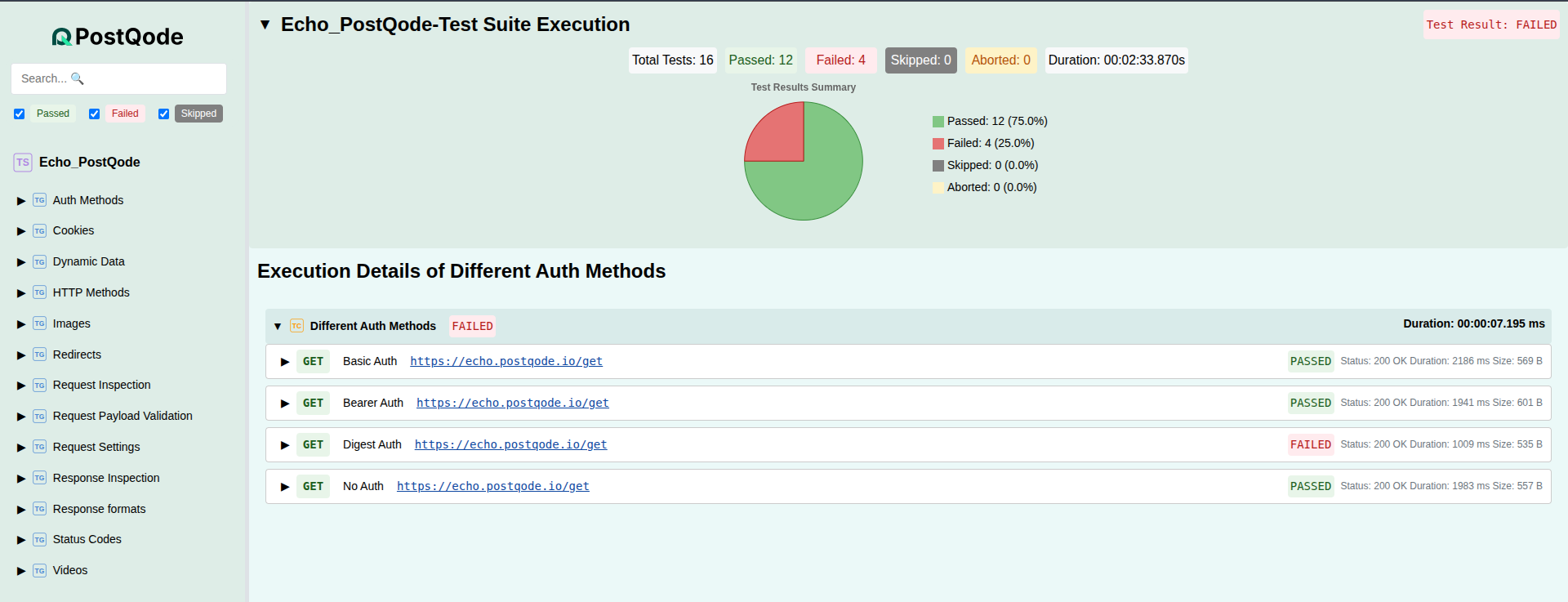
HTML reports are the default report format when executing test suites with PostQode CLI. They provide:
- Visual test results with pass/fail indicators
- Detailed execution metrics including response times
- Request/response details for debugging
- Interactive elements for better navigation
- Professional styling suitable for stakeholders
Sample HTML Report
🚀 Generating HTML Reports
Basic Usage
Generate an HTML report by executing a test suite:
# Execute with npx
npx @postqode/cli run --suite testSuites/MySuite/_meta.suite.yaml

# Or if installed globally
postqode run --suite testSuites/MySuite/_meta.suite.yaml
This creates an HTML report in the current working directory by default.
Custom Report Directory
Specify a custom directory for your execution artifacts:
npx @postqode/cli run --suite testSuites/MySuite/_meta.suite.yaml --report-dir ./reports --output test-report.html
Multiple Report Formats
Generate HTML along with JUnit and JSON formats:
npx @postqode/cli run --suite testSuites/MySuite/_meta.suite.yaml --reporter html,junit,json --report-dir ./reports
📋 Report Structure
Executive Summary
- Total Tests: Number of test cases executed
- Pass Rate: Percentage of successful tests
- Execution Time: Total time taken for test execution
- Environment: Test environment details
Test Suite Details
- Suite Information: Name, description, and metadata
- Test Case Results: Individual test case outcomes
- Performance Metrics: Response times and throughput
- Error Analysis: Detailed failure information
Request/Response Details
- HTTP Method and URL: Complete request information
- Headers: Request and response headers
- Body Content: Request payload and response data
- Status Codes: HTTP response codes
- Timing Information: Request/response timing details
🎨 Report Features
Visual Indicators
- ✅ Green checkmarks for passed tests
- ❌ Red X marks for failed tests
- ⚠️ Yellow warnings for tests with issues
- 📊 Graphs for metrics visualization
Interactive Elements
- Collapsible sections for detailed information
- Filterable results by status or test name
- Search functionality to find specific tests
- Expandable request/response details
Professional Styling
- Clean, modern design suitable for presentations
- Responsive layout that works on all devices
- Print-friendly formatting for hard copies
- Branded appearance with PostQode styling
📈 Report Analysis
Understanding Results
Pass/Fail Indicators
- Passed Tests: All assertions succeeded
- Failed Tests: One or more assertions failed
- Skipped Tests: Tests that were not executed
Performance Metrics
- Response Time: Time taken for each request
- Total Execution Time: Complete test suite duration
- Throughput: Requests per second (if applicable)
Error Details
Failed tests include:
- Assertion failures with expected vs actual values
- HTTP errors with status codes and messages
- Network issues and timeout errors
- Script errors in pre-request or test scripts
🚀 Best Practices
Report Organization
- Use descriptive test names for better readability
- Add meaningful descriptions to test cases
- Group related tests in logical test suites
- Tag tests appropriately for filtering
Documentation
- Include setup instructions in test suite descriptions
- Document expected behaviors in test case descriptions
- Add comments to complex test scripts
- Maintain version information in test suites
Sharing Reports
- Store reports in version control for historical tracking
- Archive reports by date or version
- Share via email or collaboration platforms
- Embed in CI/CD pipeline notifications
🔍 Troubleshooting
Common Issues
Report Not Generated
# Check if the command executed successfully
postqode execute -s testSuites/MySuite/_meta.suite.yaml -v
Missing Report Directory
# Ensure the report directory exists or will be created
postqode execute -s testSuites/MySuite/_meta.suite.yaml --report-dir ./reports
Incomplete Report Data
- Verify test suite structure and metadata
- Check test case configurations
- Ensure all required files are present
Report Quality Issues
- Add descriptions to test suites and cases
- Use meaningful test names instead of generic ones
- Include proper assertions with descriptive messages
- Configure environment variables for context
📚 Examples
Basic HTML Report Generation
# Generate HTML report for a test suite
postqode execute -s testSuites/UserAPI/_meta.suite.yaml

# Output: HTML report in current directory
# File: postqode-report-[timestamp].html
Advanced Report Configuration
# Generate multiple formats with custom directory
postqode execute \
  -s testSuites/UserAPI/_meta.suite.yaml \
  -w /projects/myapp \
  -c staging \
  --report-formats html junit \
  --report-dir ./test-reports
🔗 Related Topics
- Report Formats - Learn about other available report formats
- CI/CD Integration - Integrate reports into your CI/CD pipeline
- Test Suite Management - Organize your test suites effectively