Hooks in PostQode
Hooks in PostQode are powerful features that allow you to execute specific API calls at certain points during the testing process. By using hooks, you can enhance the flexibility and efficiency of your test suites, making it easier to set up, prepare, clean up, and tear down the testing environment.
Types of Hooks Available
PostQode supports four types of hooks as given below:
-
Before (before):
- You can use this hook to set up the testing environment for authentication or creating necessary data.
- Example: Call a login API and store the access token for use in subsequent tests.
-
Before Each (beforeEach):
- Executes a set of APIs before each individual test case within a group.
- You can use this to reset the test state or create fresh test data for each test.
- Example: Call an API to create a new test product before each test case.
-
After Each (afterEach):
- Executes a set of APIs after each individual test case, regardless of its outcome.
- You can use this to clean up resources or reset the state after each test.
- Example: Call an API to delete test data created during a test.
-
After (after):
- Executes a set of APIs once after all tests in a group to clean up the test environment.
- Perfect for final cleanup and teardown of the testing environment.
- Example: Call logout APIs or delete all test data created during the testing process.
Any data set in a local variable using pq.variables.set("variableName", value); within a before hook will be available throughout the entire testing lifecycle, including all hooks. This ensures that variables initialized during setup can be used consistently and referenced during the test execution and teardown processes.
Hook Execution Lifecycle & Scoping
PostQode executes hooks at two distinct structural levels:
1. Parent-Level Hooks (Test Suite Level)
Hooks defined at the Test Suite level apply globally across all test groups and test cases within the suite:
BEFORE: Executes once before any test groups or test cases run.BEFOREEACH: Executes before every test case across the entire suite.AFTEREACH: Executes after every test case across the entire suite.AFTER: Executes once after all test groups and test cases have completed.
2. Child-Level Hooks (Test Group Level)
Hooks defined at the Test Group level apply strictly to test cases contained within that specific group:
BEFORE: Executes once before test cases in that group start.BEFOREEACH: Executes before each test case in that group.AFTEREACH: Executes after each test case in that group.AFTER: Executes once after all test cases in that group finish.
Hook Failure & Error Handling Behavior
PostQode defines strict, deterministic rules when hook execution encounters an error or assertion failure:
| Failure Location | Effect on Test Cases | Teardown (AFTER/AFTEREACH) Behavior |
|---|---|---|
Suite BEFORE Fails | All test groups and cases in the suite are marked SKIPPED. | Suite AFTER still executes to ensure cleanup. |
Suite BEFOREEACH Fails | The current test case is marked SKIPPED; subsequent test cases proceed. | AFTEREACH for the skipped test case still executes. |
Suite AFTEREACH Fails | Current test case is marked FAILED; subsequent cases proceed. | Suite AFTER still executes. |
Suite AFTER Fails | Failure is logged; completed test results are unaffected. | — |
Group BEFORE Fails | All test cases in that specific group are SKIPPED. | Group AFTER still executes. |
Group BEFOREEACH Fails | Specific test case in group is SKIPPED; next test case proceeds. | Group AFTEREACH still executes. |
Complete Hook Execution Order Example
For a Test Suite containing 2 Test Groups, each with 2 Test Cases, the exact execution sequence is:
Test Suite: BEFORETest Group 1: BEFORETest Suite: BEFOREEACH(for Group 1, Case 1)Test Group 1: BEFOREEACH(for Group 1, Case 1)- Execute Case 1
Test Group 1: AFTEREACH(for Group 1, Case 1)Test Suite: AFTEREACH(for Group 1, Case 1)Test Suite: BEFOREEACH(for Group 1, Case 2)Test Group 1: BEFOREEACH(for Group 1, Case 2)- Execute Case 2
Test Group 1: AFTEREACH(for Group 1, Case 2)Test Suite: AFTEREACH(for Group 1, Case 2)Test Group 1: AFTERTest Group 2: BEFORE(Repeats steps 3–12 for Group 2)Test Group 2: AFTERTest Suite: AFTER
Create Hooks
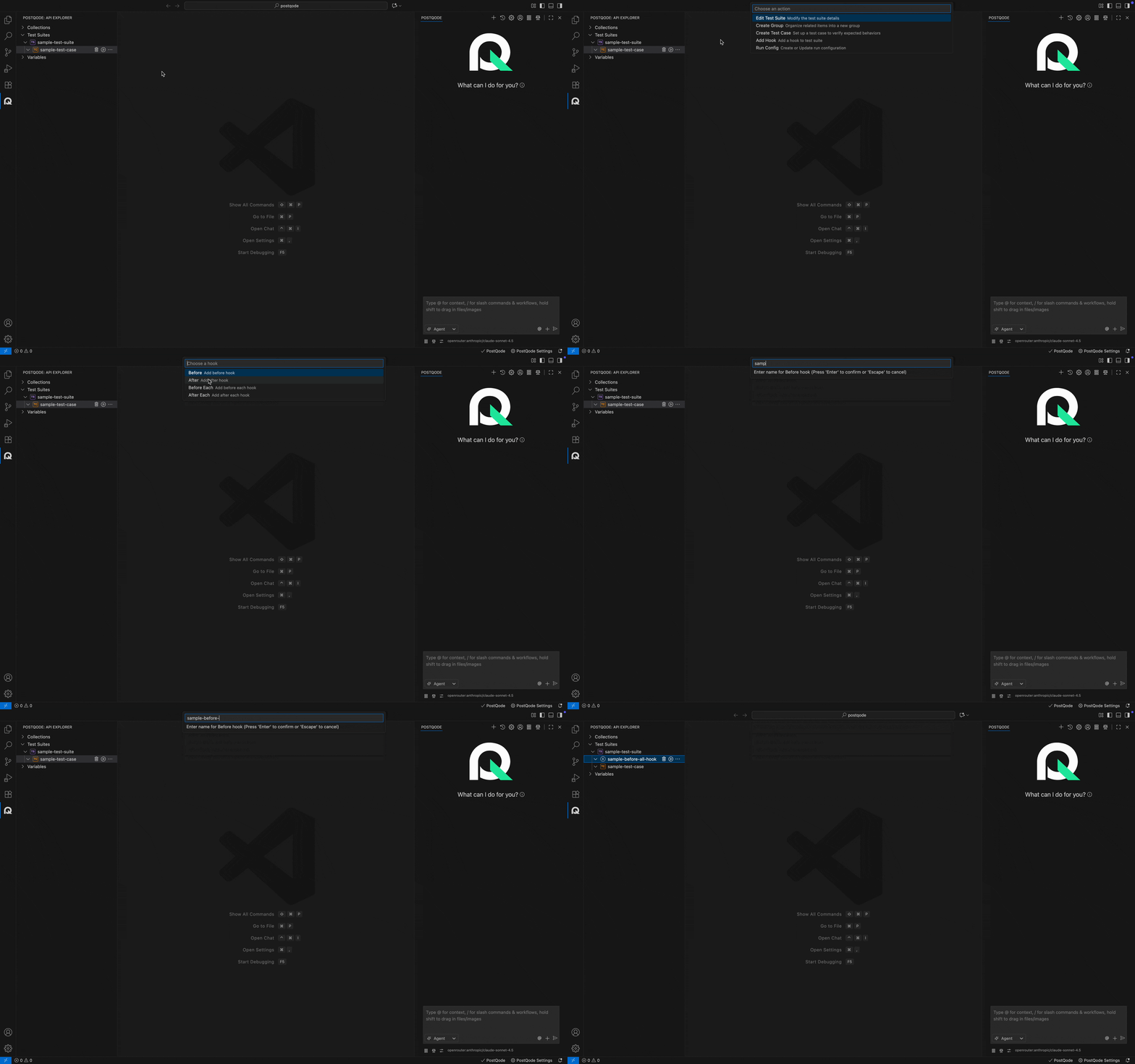
Users can add hooks by following these steps:
Step 1: Click on the more options menu (⋯) in the corresponding Test Suite or Group where you need to create the hook.
Step 2: Click on the Add Hook option from the action menu.
Step 3: Select the Hook Type from the action menu.
Step 4: Fill in the hook name in the Action Menu input and click the Enter button.
Best Practices for Hooks
- Manage Authentication: Use the
BEFOREsuite hook to log in and set authentication bearer tokens inpq.variables. - Deterministic Teardown: Use
AFTERhooks to delete created test entities, ensuring clean test environments even when test assertions fail. - Avoid Fragile Dependencies: Keep hooks lightweight and resilient to prevent accidental cascading test skips.