What are Test Cases?
A Test Case in PostQode represents a sequence of API requests with defined validations and expected responses. It serves as a blueprint for testing API functionality, containing all necessary components, such as request parameters, headers, authentication details, and assertions to verify that the API behaves correctly.
Each Test Case follows a structured format, which allows you to configure request details, set up data validations, and define expected outcomes through the low-code interface of the platform. You can also include pre-conditions, test data, and post-conditions to ensure comprehensive API testing.
Creating New Test Case
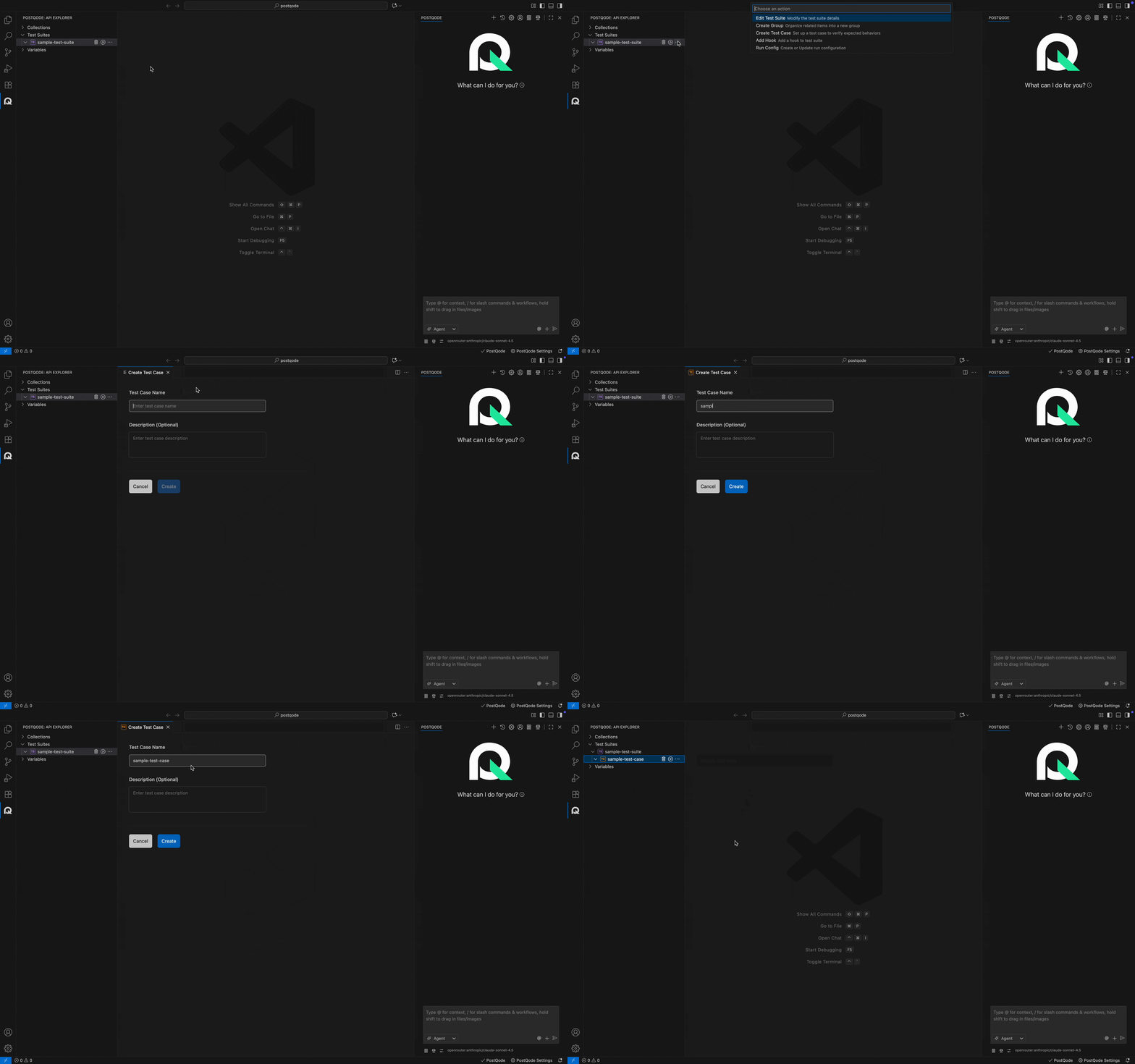
Step 1: Click on the more options menu (⋯) in the corresponding Test Suite where you need to create the test case.
Step 2: Click on the Create Test Case option from the action menu. This action opens the Create Test Case window.
Step 3: Fill in the Test Case name and description (optional) and click the Create button.
Note: The name should not start with a space or dot (.).
Test Case Execution
Step 1: Navigate to the Test Case.
Step 2: Click on the Run icon on the Test Case.
Step 3: Select the Run configuration (if present) or click on Run Anyway (to execute without configuration).
Step 4: Verify the execition report.
