Focus Chain
Focus Chain is a task management enhancement feature in PostQode that provides automatic todo list management with real-time progress tracking throughout your tasks.
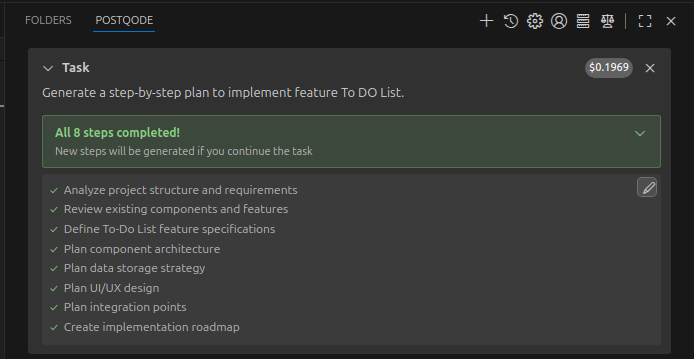
This enables PostQode to work on long-horizon tasks, seamlessly managing the context sent to LLMs, and keeping PostQode on track across many context window resets.
Key Features
Automatic Todo List Generation
PostQode analyzes your task and automatically creates a comprehensive todo list with:
- Clear, actionable items in markdown checklist format
- Logical breakdown of complex tasks into manageable steps
- Real-time updates as work progresses
User-Editable Todo Lists
Todo lists are stored as editable markdown files:
- Direct editing through your preferred markdown editor
- Automatic detection of changes you make
- Seamless integration back into PostQode's workflow
- Quick access through the edit button in the task header
Visual Progress Tracking
The task header displays clear progress indicators:
- Step counters showing current progress (e.g., "3/8")
- Completed items clearly marked with checkmarks
- Current work highlighted with indicators
- Expandable view to see the full todo list
Smart Reminder System
Configurable reminders ensure todo lists stay current:
- Default reminder every 6 messages (customizable 1-100)
- Automatic prompts when switching from Plan Mode to Agent Mode
- User-triggered updates when todo lists are manually edited
Getting Started
1. Open PostQode Settings
- Click the gear icon in the PostQode sidebar
- Navigate to the "Features" section
2. Enable Focus Chain
- Check "Enable Focus Chain"
- Optionally adjust "Remind PostQode Interval" (default: 6 messages)
3. Start a New Task
- Begin a new task
- PostQode will automatically start creating and managing todo lists
Subtask Execution & States
When a task begins, Focus Chain breaks it down into clear subtasks. Each subtask progresses through distinct lifecycle states in the interface:
- Loading / In-Progress: Indicated while PostQode is actively working on the current subtask (reading files, writing code, or running tests).
- Pause: You can pause execution at any point to inspect intermediate results, test changes manually, or adjust the prompt before resuming.
- Completed: Once a subtask's implementation and verification succeed, it is marked as completed with a checkmark and PostQode advances to the next item.
| Setting | Default | Range | Description |
|---|---|---|---|
| Enable Focus Chain | Disabled | On/Off | Enables enhanced task progress tracking |
| Remind PostQode Interval | 6 | 1-100 messages | How often PostQode updates the todo list |
Usage Examples
1. Task Initiation
When you start a new task with Focus Chain enabled:
User: "Create a user authentication system for my React app"

PostQode: [Analyzes request and creates todo list]
2. Todo List Created
PostQode creates a comprehensive plan for the task, stored in a markdown file:
- [ ] Set up project structure
- [ ] Install authentication dependencies
- [ ] Create user registration component
- [ ] Implement login functionality
- [ ] Add password validation
- [ ] Set up user database schema
- [ ] Write authentication tests
- [ ] Deploy to staging environment
3. Progress Tracking
As PostQode works, the task header shows real-time progress:
[3/8] Implement login functionality ⌄
Click to expand and see the full list:
✓ Set up project structure
✓ Install authentication dependencies
✓ Create user registration component
○ Implement login functionality  ← Currently working
○ Add password validation
○ Set up user database schema
○ Write authentication tests
○ Deploy to staging environment
4. User Editing
Need to tweak the todo list? No problem.
-
Open the todo list Click the edit button in the expanded todo view
-
Edit the markdown file A markdown file opens in your editor:
# Focus Chain Todo List for Task abc123

<!-- Edit this markdown file to update your focus chain todo list -->
<!-- Use - [ ] for incomplete items and - [x] for completed items -->

- [x] Set up project structure
- [x] Install authentication dependencies (e.g., Firebase Auth)
- [x] Create user registration component
- [ ] Implement login functionality
- [ ] Add password reset feature
- [ ] Set up protected routes
- [ ] Implement logout functionality
- [ ] Add user profile page
- [ ] Write authentication tests
- [ ] Deploy to staging environment

<!-- Save this file to update the task's todo list -->
-
Make your changes Add, remove, or reorder items as needed
-
Save the file PostQode automatically detects and uses your updates
Focus Chain turns PostQode into your personal project manager, keeping you on track and your tasks organized. Give it a try on your next project!