@ Mentions Overview
@ mentions are one of PostQode's most powerful features, letting you seamlessly bring external context into your conversations. Instead of copying and pasting code, error messages, or documentation, you can simply reference them with an @ symbol.
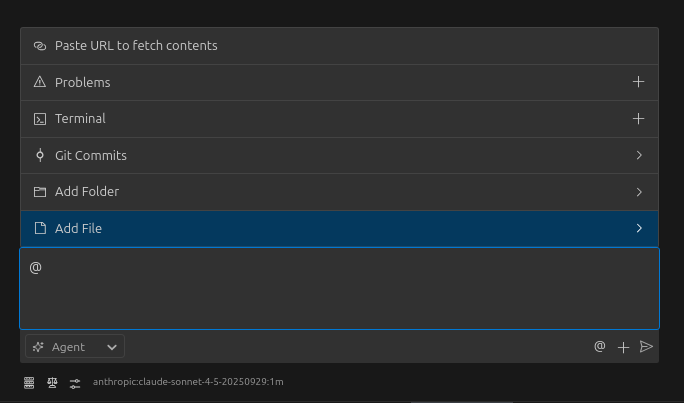
When you type @ in the chat input, PostQode shows a menu of available mention types. These mentions let you reference files, folders, problems, terminal output, git changes, and even web content directly in your conversations.
Available @ Mentions
PostQode supports several types of @ mentions, each designed to bring different kinds of context into your conversations:
Reference web content with @https://example.com. PostQode fetches and sees the complete webpage content, perfect for
referencing documentation or GitHub issues.
Use @problems to show PostQode all the errors and warnings in your workspace. PostQode sees the complete list with file locations
and error messages.
Use @terminal to share your recent terminal output. PostQode sees the complete output with formatting preserved, perfect for
debugging build errors or test failures.
Reference uncommitted changes with @git-changes or specific commits with @[commit-hash]. PostQode sees the complete diff,
commit message, and other relevant information.
Reference entire directories with @/path/to/folder/. PostQode sees the folder structure and all file contents, perfect for
understanding complex interactions between multiple files.
Reference any file in your workspace with @/path/to/file. PostQode sees the complete file content, including imports, related
functions, and surrounding context.
Why @ Mentions Matter
@ mentions transform how you interact with PostQode by:
-
Eliminating copy-paste: No more copying and pasting code, error messages, or terminal output. Just reference them directly.
-
Preserving context: PostQode sees the complete context, including imports, related functions, and surrounding code that might be relevant.
-
Maintaining formatting: Terminal output, error messages, and web content keep their formatting, making them easier to understand.
-
Enabling complex workflows: Combine multiple @ mentions to give PostQode a complete picture of your problem:
I'm getting these errors: @problems

Here's my component: @/src/components/Form.jsx
And the API endpoint: @/src/api/users.js

The error happens when I submit: @terminal

I think this commit might have caused it: @a1b2c3d
Getting Started
To use @ mentions:
- Type
@in the chat input - Select the type of mention from the menu or continue typing
- For files and folders, navigate through your workspace structure
- Send your message as usual
PostQode will automatically process the mentions and include the referenced content in the context sent to the AI.
Try using @ mentions in your next conversation with PostQode - you'll be amazed at how much more efficient and effective your interactions become when you can seamlessly bring in external context.
How It Works Under the Hood
When you use @ mentions in your messages, there's a sophisticated process happening behind the scenes:
-
Detection: When you send a message, PostQode scans the text for @ mention patterns using regular expressions
-
Processing: For each detected mention, PostQode:
- Determines the mention type (file, folder, problems, terminal, git, URL)
- Fetches the relevant content (file contents, terminal output, etc.)
- Formats the content appropriately
-
Enhancement: The original message is enhanced with structured data:
Your original message with @/path/to/file

<file_content path="/path/to/file">
[Complete file content]
</file_content> -
Context Inclusion: This enhanced message with all the embedded content is sent to the AI model
-
Seamless Response: The AI can now "see" all the referenced content as if you had manually copied and pasted it
This entire process happens automatically and seamlessly whenever you use @ mentions, giving the AI complete context without you having to manually copy anything.
Each type of @ mention has its own specific implementation details, which you can find in their respective documentation pages.