Git Mentions
How to Use Git Mentions
To bring git status, uncommitted working changes, or past commits into your conversation:
- Type
@in the PostQode chat box. - In the suggestions menu, select "Git Commits".
- From the submenu options, choose "Working Changes" to insert
@git-changesinto the prompt (or type@git-changesdirectly). - To reference a specific past commit, select it from the list or type
@followed by the commit hash (minimum 6 characters, e.g.@641eeaor@a1b2c3d). - PostQode automatically resolves the commit metadata, author, message, and diff into your prompt context.
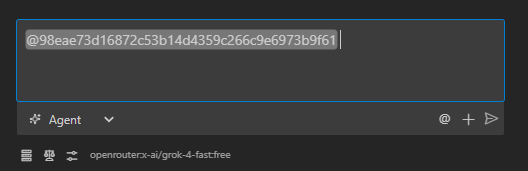
I think this commit broke our authentication flow: @641eea

Can you explain what changed and why it might be causing the issue?
This gives PostQode the complete commit information, including the commit message, author, timestamp, and full unified diff.
The @git-changes mention is perfect when you're working on local modifications and want architectural or security feedback before committing:
Here are my current changes: @git-changes

I'm trying to implement a new feature for user profiles. Does my approach make sense?
Are there any potential issues or improvements you'd suggest?
How It Works Under the Hood
For Working Changes (@git-changes)
-
When you send your message, PostQode detects the
@git-changestoken. -
The extension executes git commands (
git status --porcelain,git diff, andgit diff --cached) against your workspace repository. -
Direct File Reading: In addition to standard unified diffs, PostQode directly reads the contents of modified and untracked files from the filesystem. This ensures that newly created untracked files and full file context are completely captured even if they have not yet been staged.
-
The structured working state is injected into your prompt:
<git_working_state>
On branch main
Changes not staged for commit:
  modified: src/components/Button.jsx
  modified: src/styles/main.css

[Complete diff output with all changes]
</git_working_state>
For Specific Commits (@[commit-hash])
-
When you send your message, PostQode detects the
@followed by a commit hash pattern -
The extension runs
git showand related commands to get information about that commit -
It retrieves the commit message, author, date, and the complete diff
-
This information is appended to your message in a structured format:
<git_commit hash="a1b2c3d">
commit a1b2c3d4e5f6g7h8i9j0k1l2m3n4o5p6q7r8s9t
Author: Developer Name <[email protected]>
Date: Mon May 20 14:30:45 2025 -0700

Fix authentication bug in login form

[Complete diff output showing all changes in the commit]
</git_commit>
This process happens automatically whenever you use git mentions, giving the AI complete visibility into your code changes without you having to copy and paste diffs or commit logs.